Disposable Pixels (UI) On A Durable Substrate
How Agents And Generative UI Help Federation Finally Work
The pixel is whatever the human can see and click at a given moment. The substrate is everything underneath the screen. Stick with me to see why your long-standing skillset is more important than ever.
You have been building serious systems for years.
You know integration pain. You have lived through on prem, SOA, ESBs, cloud migrations, microservices, dashboards, and multiple generations of “single pane of glass” slides.
You are now hearing new words:
- Agents
- Disposable pixels
- Generative UI
If those feel like hype or like they belong to a different generation of builders, this piece is for you.
The goal here is to:
- Translate the “agents will kill your UI” story into language that fits existing mental models
- Show how this is really about federation vs integration, mostly at the data and workflow layer
- Help you see where your work fits in a world of substrates, agents, and throwaway interfaces
You do not need to become an AI researcher. You do need a clear map.
🧠 Pattern
Treat this whole article as a vocabulary upgrade for skills you already have.
You are not learning a new religion. You are giving names to patterns you have seen for a long time.
1. What actually changed
For about forty years, the pattern looked like this:
- Software was expensive to design, build, and deploy
- Interfaces were hard to change and even harder to retrain people on
- Organizations standardized on big suites
- Integration often meant “get everyone into the same app” and then bolt on some glue
If you have ever:
- Spent months rolling out Salesforce, Workday, Oracle, SAP, Jira, or ServiceNow
- Created huge training decks and certification programs so people could “learn the app”
- Been afraid to touch a critical screen because of change management blowback
You were living in that world.
Two big things changed.
1.1 Models can generate interfaces
We now have models that can:
- Take a plain language description of a chart, panel, or workflow
- Produce a decent user interface in seconds
- Iterate on that interface as the question changes
You are already seeing this when:
- A tool like Perplexity or ChatGPT returns a table, chart, or mini dashboard that did not exist until you asked
- A design tool turns a text prompt into a multi screen mockup
User interfaces used to be scarce. Now they can be cheap and plentiful.
1.2 Agents can drive multiple systems
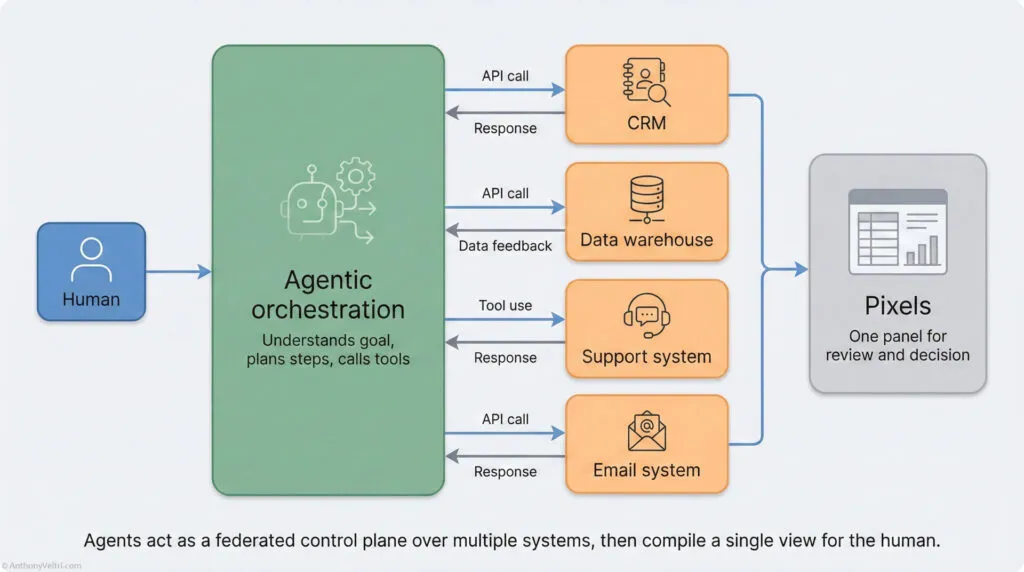
We also have software that can:
- Read a natural language goal
- Break it into steps
- Call APIs or tools for each step
- Adapt based on the results
Example intent:
“Show me all enterprise customers in Europe with renewals this quarter, any account that has not been touched in 45 days, and draft an outreach plan by account manager.”
An agent can:
- Hit CRM for renewals
- Hit the warehouse for activity logs
- Hit support and ticketing for recent pain
- Build a ranked list of accounts
- Draft suggested emails or tasks
In other words, the machine does more of the “walk across five systems, click ten screens, paste into a spreadsheet” work that used to fall on your analysts.
🧩 Definition
Agent in this article means:
Software that can understand a goal in natural language, decompose it into steps, call tools or APIs to perform those steps, and adjust based on what happens.
Nothing mystical. Think “programmable junior analyst” with really good tool access.
Put those two shifts together and you get:
- UI is no longer a fixed destination you “go to learn”
- UI can be generated on demand for one user and one moment
- The real value shifts down into data, workflows, rules, and APIs
Which is exactly where your integration and federation decisions already live.
2. Vocabulary in plain language
Before we talk about architecture, we should agree on the terms in grounded, non glamorous language.
2.1 Substrate
The substrate is everything underneath the screen.
It includes:
- Schemas, tables, graphs, objects, streams
- Permissions, roles, security policy
- Workflow engines and business rules
- Audit logs, compliance hooks, traceability
- APIs, events, webhooks
If you are a data architect, backend engineer, or enterprise architect, this is where you live. It is the part of the system that must be boringly correct and stable.
2.2 Pixels
By pixels here we mean:
- Whatever the human can see and click at a given moment
- Dashboards, forms, charts, panels, wizards, chat windows
- The layout, labels, colors, buttons, interactions
Historically, these pixels:
- Took a long time to design and ship
- Stayed the same for months or years
- Were the main thing shown in demos and RFPs
- Defined how users thought about “the product”
Practitioners are starting to talk about “disposable UI” and “ephemeral interfaces” to describe on demand, single use screens. In my work I use the phrase disposable pixels to highlight what is changing: the pixels that make up these UIs are cheap and temporary, the substrate and schemas underneath are not.
2.3 Disposable pixels
Disposable pixels are interfaces that:
- Are created quickly from intent and context
- Might only exist for one user and one question
- Can be discarded or recreated with almost no cost
You have seen prototypes of this already:
- A one off internal tool someone built for a quarterly review
- A temporary dashboard for an incident or event
- A custom visual that a BI person threw together to answer one argument
The difference now:
- Generative tools can create these panels on demand
- Agents can wire them to live data
- You are no longer limited to the screens your product team had time to build
🔍 Orientation
Disposable does not mean sloppy.
It means “cheap enough to create, change, and discard without a six month design cycle.”
2.4 Agents, one more time
In theory papers you will see long taxonomies of agents.
You do not need all of that.
For software architects and leaders, it is enough to think in layers:
- At the bottom, you have tools and APIs
- In the middle, you have agents that pick which tools to call in which order
- At the top, you have humans stating goals and making judgment calls
You can have:
- Tiny single purpose agents that drive one workflow
- Larger orchestration agents that coordinate many tools and systems
- Domain specific agents that understand your vocabulary and rules
The key shift is:
Instead of wiring every workflow by hand in code or BPMN, you give the agent a set of tools and let it build and adapt workflows on the fly.
2.5 Federation vs integration in this world
Short version:
- Integration is where you make systems behave like a coherent whole
- Shared schemas
- Shared identities
- Shared workflows and error handling
- Strong guarantees about traceability
- Federation is where you accept that systems and partners keep autonomy
- Different stacks and vendors
- Different domains of control
- Coordinated through contracts instead of common platforms
In the substrate plus agents plus pixels picture:
- Integration happens mostly in the substrate
- Federation happens mostly in the agent layer and UI layer
3. The three layer model, in your terms
We can restate the “disposable pixels” idea in a three layer model and map it to things you already know.
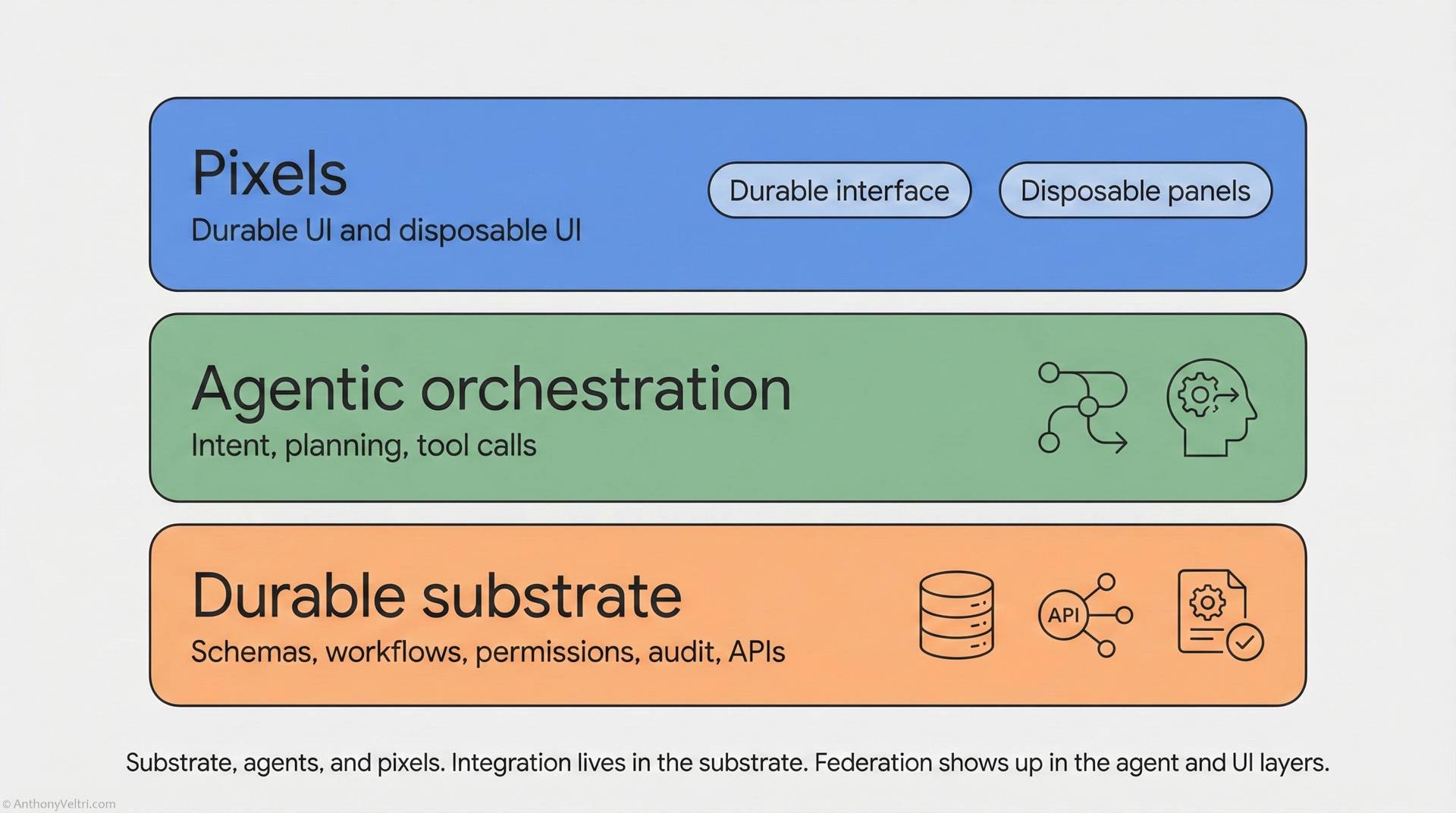
Layer 1 – Durable substrate
This is where your hardest work should live.
Contains:
- Systems of record
- Decisioning and pricing engines
- Shared reference data and vocabularies
- Permissions, audit, compliance
- Clean APIs and events
- Idempotent operations and predictable behavior
In vendor language, this is where their “moat” lives. In your language, this is where you do the real integration work.
Concrete example:
- CRM owns canonical customer records and renewals
- Billing owns invoices and payment state
- Ticketing owns cases and resolution history
Each exposes:
- Well documented schemas
- Stable identifiers
- Safe write paths
- Clear error modes
⚓ Anchor
In this model, do not let the UI be the moat.
Let the substrate be the moat: schemas, contracts, and guarantees that agents can rely on.
Layer 2 – Agentic planning and orchestration
This is where federation comes to life.
The agent layer:
- Accepts natural language intent
- Maps that intent to known tools and APIs
- Plans a sequence of calls across systems
- Decides which steps can be automated and which need human review
- Produces results that a human can understand and act on
This is not entirely new. You already have:
- Orchestration engines
- ETL pipelines
- Microservice call graphs
The difference is:
- Agents reason in terms a human can state directly
- They can adjust plans when partial results come back differently than expected
- They can generate and wire up temporary interfaces to support a decision
Example:
Intent: “Find customers at renewal risk, rank them by urgency, and prepare outreach.”
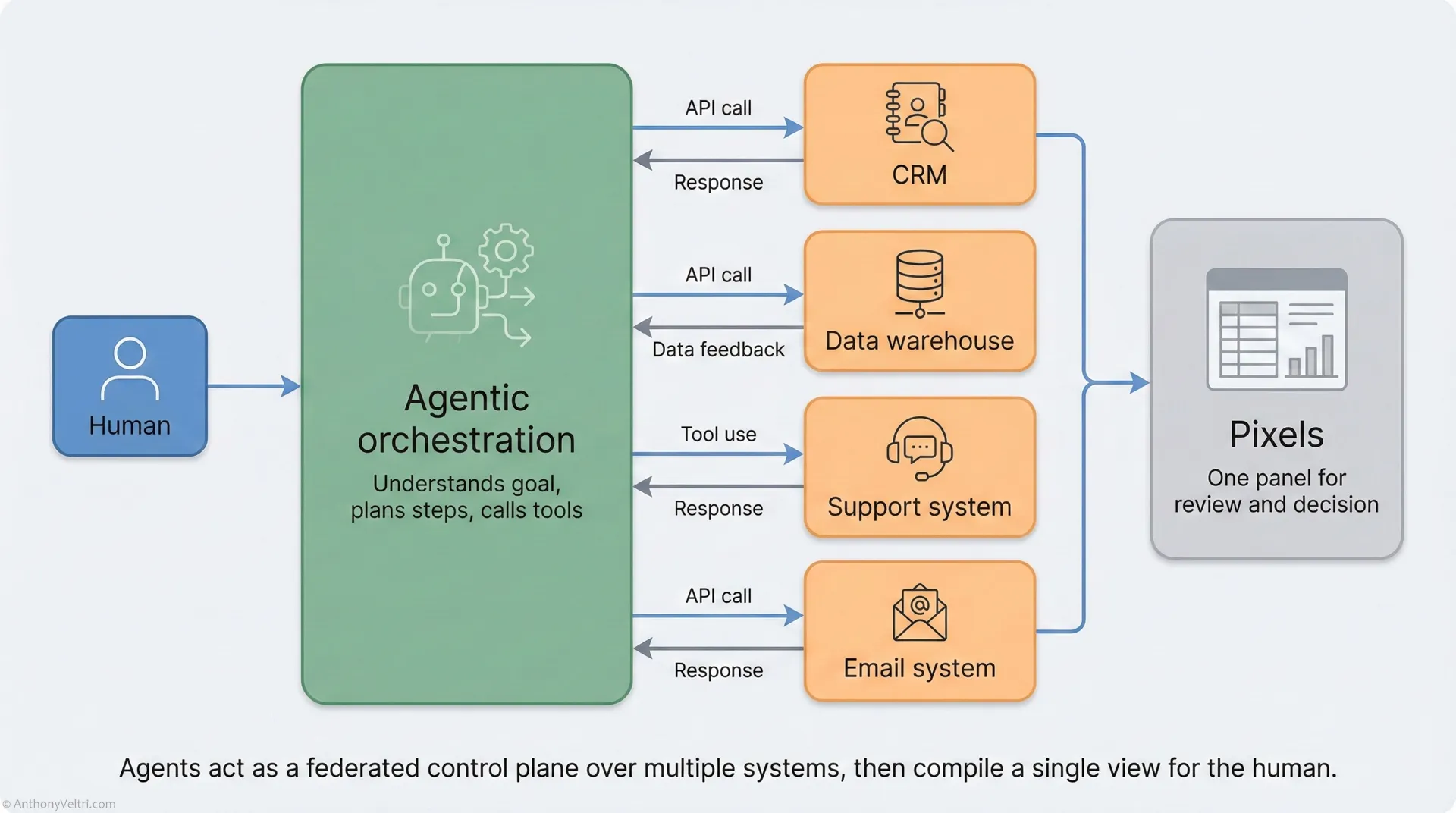
The agent might:
- Query the CRM for renewals in the next quarter
- Pull churn signals from the warehouse and support system
- Combine signals into a risk score
- Create suggested emails or tasks
- Surface a panel for approval
Notice the relational pattern:
- The agent treats each system as a peer through its API
- No single vendor UI is the required front door
- The human sees one orchestrated view instead of five disjointed products
That is federation in practice.
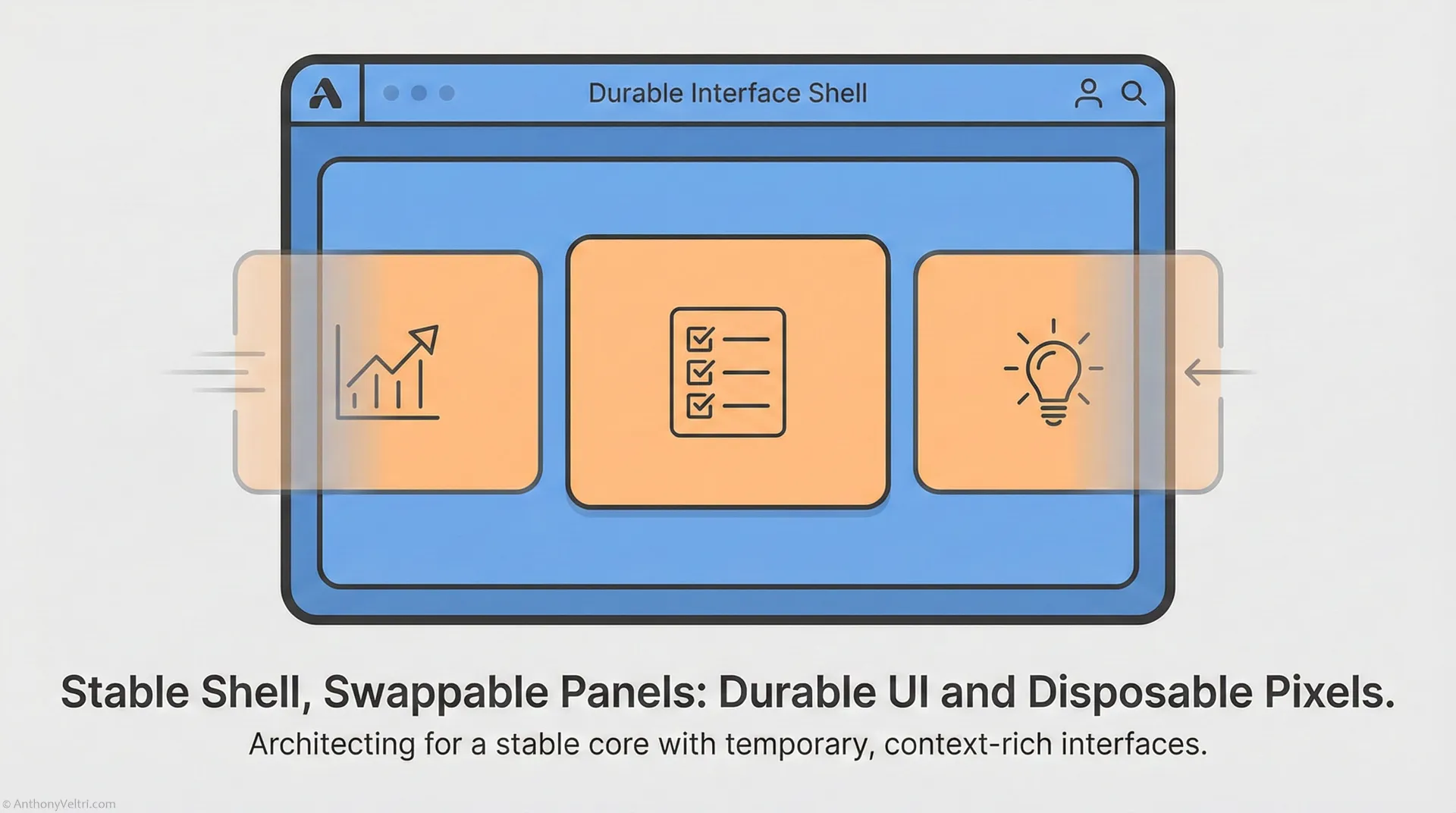
Layer 3 – Pixels, durable and disposable
On top of this, you still need UI.
The pattern that emerges looks like a two tier UI strategy.
Durable interfaces:
- Home dashboards
- Core operational screens
- Shared team views for training and incident response
- Regulated flows that auditors will revisit
These should be:
- Stable
- Well structured
- Familiar enough that people build spatial memory and muscle memory
Disposable interfaces:
- Ad hoc dashboards for a specific question
- Micro tools for a one time review
- Custom panels for a board meeting or incident
- Narrow editors for exactly one decision
These can be:
- Generated from text and context
- Created and destroyed frequently
- Saved only when they prove useful over time
For durable UI:
- You invest in classic UX craft and documentation
For disposable UI:
- You invest in good building blocks, constraints, and guardrails
- You let agents and generators assemble the specific layouts
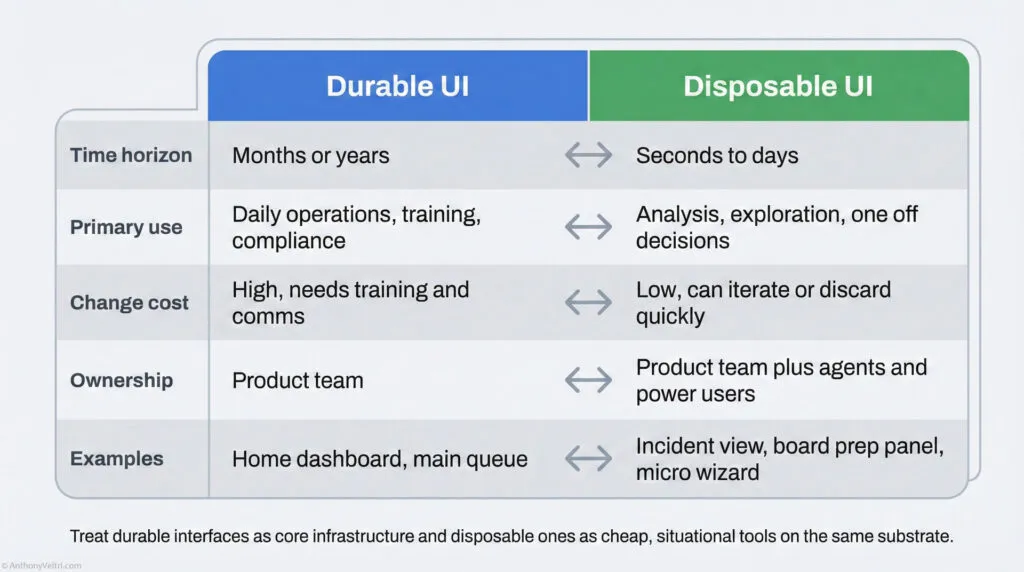
Comparison table: Durable UI vs Disposable UI
| Factor | Durable UI | Disposable UI |
|---|---|---|
| Time horizon | Months or years | Seconds to days |
| Primary use | Daily operations, training, compliance | Analysis, exploration, one off decisions |
| Change cost | High, needs training and comms | Low, can iterate or discard quickly |
| Ownership | Product team | Product team plus agents and power users |
| Examples | Home dashboard, main queue | Ad hoc incident view, board prep panel, micro wizard |
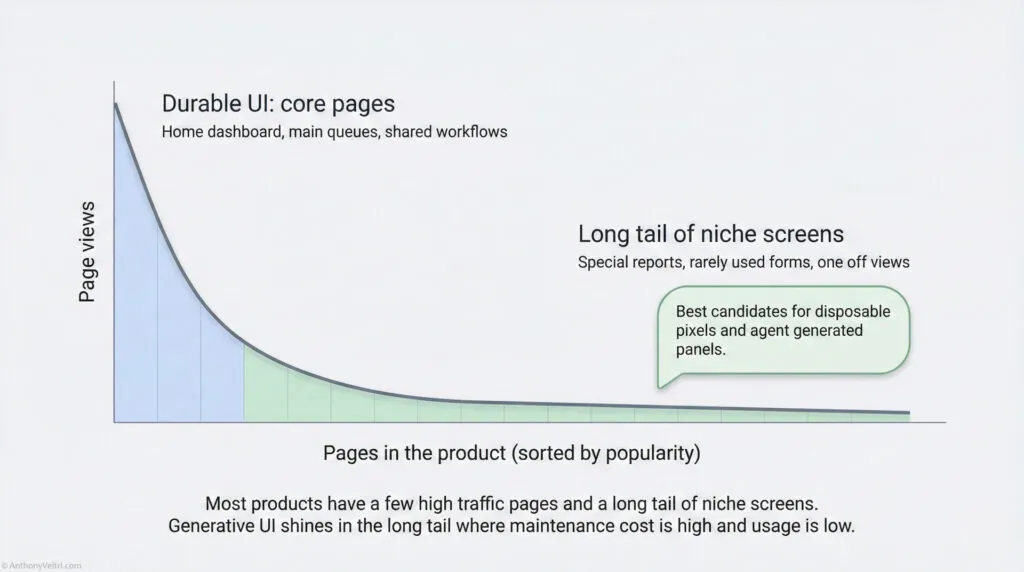
🧠 Pattern
Most products already have this split.
A handful of screens carry most of the traffic and training.
A long tail of rarely visited pages eats maintenance budget.
Disposable pixels are how you stop hand tooling the long tail.
4. Old integration patterns vs the new pattern
If you have lived through ESBs, SOA, microservices, and vendor platform wars, you are probably skeptical.
You should be. A lot of AI marketing talks like your last fifteen years never happened.
Let us be specific about what is different, and what is the same.
4.1 Old pattern: UI as integration point
Common moves:
- Pick one platform to be “where work happens”
- Wire all other systems into that platform
- Train everyone to use that vendor’s UI
- Build endless connectors, widgets, and mashup dashboards
Side effects you know:
- Vendor resists any mode that does not go through their screens
- Change management becomes “UI trauma” for the whole organization
- Partners who cannot or will not adopt the big suite fall behind
- People quietly escape back to Excel and PowerPoint
4.2 New pattern: substrate as integration point
In the substrate plus agents plus pixels world:
- Integration focus moves down into data and workflows
- A product is “good” when it is agent addressable
- Clean schema
- Predictable API behavior
- Safe write patterns
- Clear permissions and auditing
- The UI is just one of many possible projections of the substrate
- Customers might keep some vendor screens, replace others, and generate custom ones
You can summarize the shift like this:
Old world: “Everyone must live inside our app.”
New world: “We expose a high integrity substrate. You may live inside our app, your own agents, or both.”
That is a fundamentally more federated stance.
⚠️ Pitfall
If your product can only be operated by scraping its own UI, you are in trouble.
Agents will still get what they need, but they will treat you as a legacy obstacle, not a first class peer.
5. Why this is good news for federated systems
Federated environments have always had two big problems.
5.1 You cannot force everyone onto one stack
Reality:
- Different agencies, business units, or partners have their own constraints
- Legal, regulatory, or sovereignty issues block centralization
- Politics and culture matter as much as technology
This means:
- Central “one vendor for everything” strategies hit hard limits
- Attempts to replace everything with “the new platform” rarely complete
5.2 Humans have carried the integration burden
Reality:
- Analysts log into five systems and reconcile numbers by hand
- Reports are produced by heroics, not by pipelines
- Critical decisions happen in slide decks that drift away from the system of record
This leads to:
- Slow decisions
- Hidden labor
- Risk when key people leave
The new pattern directly attacks both problems.
5.3 Federated substrate
Instead of one database, you aim for:
- Multiple systems of record, each owning part of reality
- Shared vocabularies and IDs at the boundaries that matter
- Common treatment of time, geography, and identity where coordination is required
You do not need every field to be shared.
You do need enough shared structure for agents to reason across systems.
5.4 Agent layer as federated control plane
Instead of:
- Humans doing “swivel chair integration” between UIs
You have:
- Agents calling each system through its APIs
- Shared logic for routing and escalation
- Common handling of errors and partial data
Think of it as:
“A shared brain that can look across systems, without owning any of them.”
5.5 Disposable pixels as federated views
Different roles can look at the same situation through different panels:
- Operations lead sees tempo, capacity, and alerts
- Finance sees cost, burn rate, and exposure
- Legal sees obligations and risk thresholds
- Local partners see the subset that belongs to their jurisdiction
All of these views:
- Rest on the same substrate
- Are driven by the same agent logic
- Can be generated or updated without a platform war
This is federation that users can actually live with.
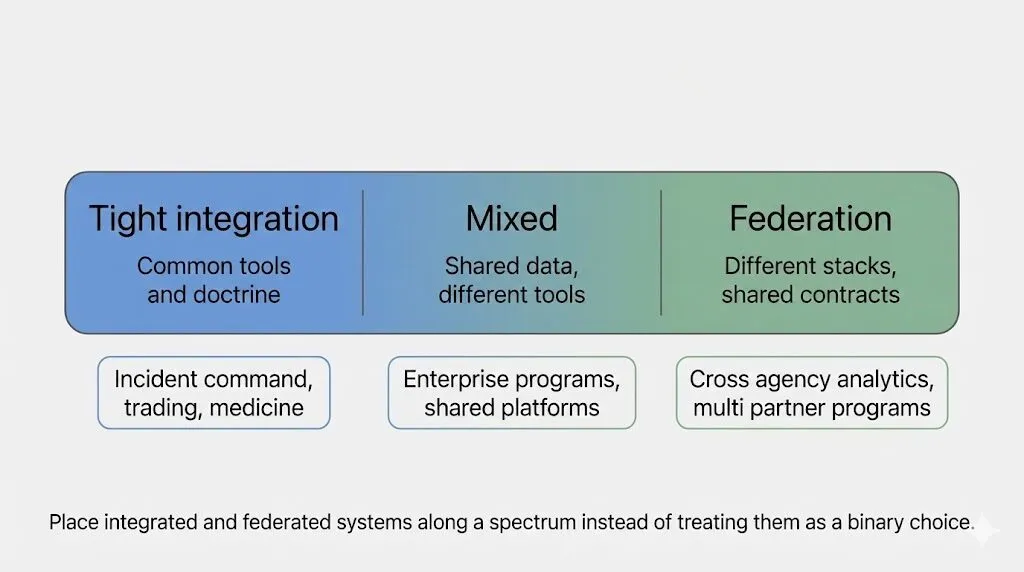
6. Where tight integration is still non negotiable
The obvious question: should we federate everything now?
No.
There are domains where you still want:
- Strongly integrated tooling
- Very stable interfaces
- Heavy doctrine and training
Examples:
- Incident command and emergency operations
- Air and ground safety workflows
- Trading desks and other high risk, high tempo environments
- Clinical workflows and regulated medical systems
In those domains:
- People rely on deep spatial memory of their tools
- Pixel level changes can create confusion and risk
- Auditors may literally ask “show me what was on screen when this decision was made”
Here the right pattern looks more like:
- Integrated substrate
- Integrated, stable UI
- Agents acting as assistants inside that UI rather than free roaming orchestrators
You can still:
- Let agents pre fill fields
- Let models generate candidate charts or checklists
- Let generative tools help with documentation and after action reviews
But you do not:
- Let the entire UI reshuffle every time
- Outsource core decisions to agents without very careful guardrails
🚧 Boundary
Federation is not a moral good. It is a design choice.
In safety critical or tightly regulated domains, you choose more integration and more coherence on purpose.
7. Practical checklist for architects and leaders
If you own systems, products, or platforms, here is a pragmatic way to respond.
7.1 Make your system agent addressable
Ask:
- Do we expose APIs for the real work, or only for “toy” operations
- Are our schemas documented, stable, and testable
- Can an external agent perform an end to end workflow without scraping our UI
- Do we provide idempotent, safe write paths
If the answer is no, your system will be harder to orchestrate and easier to route around.
7.2 Move integration effort into the substrate
Instead of:
- Forcing everyone onto your UI
- Spending months on cross product UI stitching
Focus on:
- Shared vocabularies and identifiers where you truly need them
- Domain events that reflect real world changes, not just system side effects
- Common patterns for permissions, identity, and auditing
This is slow, unglamorous work. It is also what agents need in order to behave safely.
7.3 Experiment with disposable pixels in low risk zones
Look for:
- Internal analytics where a small team owns the risk
- Time boxed investigations and strategy work
- “Just for me” dashboards for senior leaders
Let an agent or generator:
- Assemble panels that mix data from multiple systems
- Create one off views to support a specific decision
- Offer suggested edits and actions on top of those views
Observe:
- Where it speeds people up
- Where it confuses them
- Where you need better guardrails or templates
7.4 Protect and evolve your few truly foundational UIs
Every product has:
- A small set of screens where people live
- The dashboards and queues that define “home”
- The flows that training and doctrine are built around
Identify those.
Then:
- Treat them as infrastructure, not as marketing
- Keep them stable enough that users build deep familiarity
- Improve them deliberately instead of chasing every design trend
These are your coherent cores. Generative UI should complement them, not fight them.
7.5 Map your talent to substrate, agents, and pixels
On your team:
- Who thinks in schemas, contracts, and invariants
- Who thinks in workflows, “jobs to be done,” and outcomes
- Who thinks in interaction patterns, visual hierarchy, and usability
You will need all three, but:
- Substrate talent is your long term moat
- Agent and orchestration talent connects you to the new world
- UI talent shifts from hand drawing every screen to defining interface grammars and constraints that generators use
8. Common misunderstandings and reframes
A few traps you are likely to run into.
Misunderstanding 1: “Agents will kill UI”
Reframe:
- Agents will kill the monopoly of any one UI
- There will still be UIs
- Users will have more freedom to choose where and how they see and act on data
Misunderstanding 2: “If UI is disposable, design does not matter”
Reframe:
- Design shifts tier
- Less energy on pixel perfect handcrafting for every page
- More energy on:
- Choosing good primitives
- Defining sensible defaults and constraints
- Designing templates, patterns, and “snap points” that generators can use safely
Misunderstanding 3: “Generative UI means chaos”
Reframe:
- Consistency moves into the substrate and agent layer
- The pixels can vary, but:
- States and transitions are stable
- Invariants are enforced in the substrate
- Side effects are traceable and auditable
Misunderstanding 4: “Federation means everyone does their own thing”
Reframe:
- Healthy federation means:
- Shared contracts where it matters
- Autonomy above that line
- A clear sense of which parts are negotiable and which are doctrine
Agents make that practical. They do not remove the need for design decisions.
9. Bringing it back to your work
If you are an architect or leader who has:
- Built systems that had to work the first time
- Supported partners with different tools and tempos
- Fought through brittle integrations and UI platform wars
Then this moment is not a rejection of your experience.
It is an opportunity to:
- Move your integration effort to the substrate where it can actually scale
- Use agents as a federated control plane instead of overworking your analysts
- Relax your grip on pixels and let different views flourish over a shared foundation
Your next steps are not:
- Chase every new agent demo
- Rewrite everything in the flavor of the month framework
Your next steps are:
- Make your systems excellent substrates
- Make them easy and safe for agents to orchestrate
- Decide, with intention, where you want tight integration and where you are willing to lean into federation
That is how you ride this shift instead of being dragged by it.
✅ Checkpoint
If you can answer “yes” to these three questions:
- Can an agent safely use our system without scraping the UI
- Do we know which UIs must stay coherent and which can be disposable
- Do we have at least one low risk area where we are experimenting with agent driven, generative panels
then you are already on the path toward a substrate plus agents plus pixels future that actually works in federated environments.
Last Updated on December 9, 2025